Preview

Theme Overview
Designed for nature lovers, outdoor explorers, and users who enjoy scenic environments that inspire calm focus while browsing.
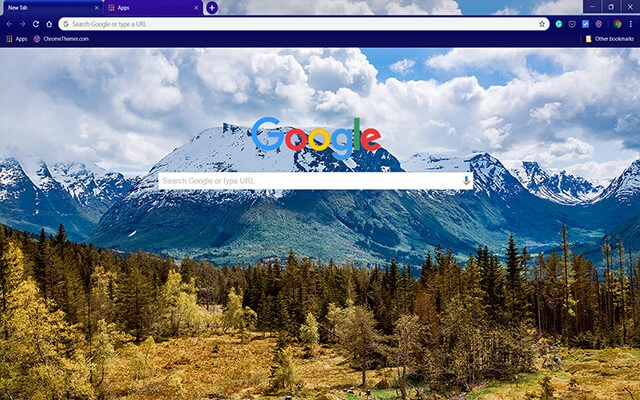
This theme features towering snow-covered mountains rising above lush forests and vibrant terrain. The crisp details and deep natural colors create an immersive landscape that refreshes your screen, providing a perfect blend of clarity, calmness, and visual depth.
- Bright scenery boosts daily motivation.
- Natural colors enhance visual clarity.
- Optimized for Chrome.
- Works great on Chromebook, Windows PC & Mac.
Behind The Theme
The mix of snowy peaks, rolling forests, and open sky delivers a balanced, uplifting visual tone. It brings the tranquility of nature into your workspace, making it ideal for users who appreciate outdoor beauty and want a relaxing backdrop while browsing.
I wanted to capture the feeling of standing atop a quiet mountain ridge, so I shaped this theme around a landscape that reflects freedom, clarity, and peaceful open air.
Screenshots
White Mountain Top is currently available in the Chrome Web Store. This custom theme is free to add to your browser and comes with lifetime updates.
How To Install
Installing a Chrome theme only takes a few seconds.
Want to switch back later? Chrome settings → Appearance → Reset to default.
FAQs
Does this Chrome theme slow down my browser?
No. Chrome themes only change the visual appearance of the browser. Performance is affected more by open tabs and installed extensions.
Can I use this theme on a Chromebook?
Yes. If a theme is available in the Chrome Web Store, it works the same way on Chromebooks, Windows, macOS, and Linux.
How do I remove or reset a Chrome theme?
Open Chrome settings, go to Appearance, and click Reset to default. Your browser will instantly return to the standard Chrome theme.
Is this theme free?
Yes. This Chrome theme is free to install from the Chrome Web Store and includes lifetime updates.
Will this theme change my homepage or search engine?
No. Themes only affect colors and background images. They do not modify your homepage, new tab behavior, or search settings.
















