BrowserWorkTools
Theme › Color Fusion

Color Fusion Chrome Theme

Color Fusion brings a smooth blend of warm reds, mellow greens, and soft yellow highlights into your browser, creating a gentle gradient that feels modern, balanced, and visually relaxing during everyday browsing.

Created by chromethemer

Preview

Theme Overview

Ideal for users who enjoy soothing color palettes, minimalistic design, and a visually gentle browsing style that supports focus and relaxation.

The theme uses a soft gradient that transitions from subtle warm tones to cool, calming hues, creating a visually smooth backdrop for your tabs. Its colors are blended to reduce eye strain while maintaining a modern, stylish feel across your browser.

  • Soft gradients reduce visual fatigue.
  • Clean aesthetic enhances browsing clarity.
  • Optimized for Chrome.
  • Works great on Chromebook, Windows PC & Mac.

Behind The Theme

Created to provide a peaceful visual environment, Color Fusion gently guides your attention without overwhelming your workspace. The graceful gradient offers a relaxing atmosphere, making every browsing session feel smoother, calmer, and more creatively inspiring.

I envisioned a theme shaped by fading sunset colors, merging into one peaceful blend, and created Color Fusion to capture that quiet moment of calm inside the browser.

Screenshots

Color Fusion preview
Screenshot

Color Fusion is currently available in the Chrome Web Store. This custom theme is free to add to your browser and comes with lifetime updates.
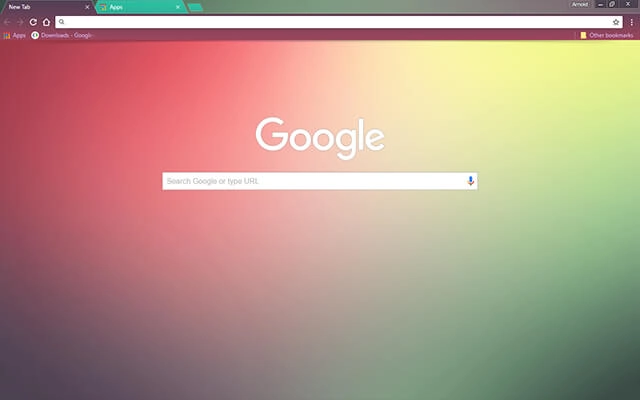
Color Fusion preview
Screenshot

How To Install

Installing a Chrome theme only takes a few seconds.

1
Click the View in Web Store button.
2
You’ll be taken to the official Chrome Web Store listing for this theme.
3
Click Add to Chrome in the top-right corner.
4
Chrome will apply the theme instantly — no restart required.

Want to switch back later? Chrome settings → Appearance → Reset to default.

FAQs

Does this Chrome theme slow down my browser?

No. Chrome themes only change the visual appearance of the browser. Performance is affected more by open tabs and installed extensions.

Can I use this theme on a Chromebook?

Yes. If a theme is available in the Chrome Web Store, it works the same way on Chromebooks, Windows, macOS, and Linux.

How do I remove or reset a Chrome theme?

Open Chrome settings, go to Appearance, and click Reset to default. Your browser will instantly return to the standard Chrome theme.

Is this theme free?

Yes. This Chrome theme is free to install from the Chrome Web Store and includes lifetime updates.

Will this theme change my homepage or search engine?

No. Themes only affect colors and background images. They do not modify your homepage, new tab behavior, or search settings.

Trending

Same vibe, slightly different energy.

Themes make is super easy to chage the way your Chrome browser looks. Browse perfectly curated categories down below:

About Chrome Themes

Chrome themes allow you to personalize the appearance of your browser without changing how Chrome functions. A theme affects visual elements such as the browser toolbar, tab bar, and new tab background, helping you create a browsing environment that feels more comfortable and visually consistent.

Unlike extensions, themes do not add features, run background scripts, or access your data. They are lightweight by design and are applied instantly through the official Chrome Web Store, making them one of the simplest ways to customize Chrome safely.

Many users choose themes to reduce visual strain during long browsing sessions, improve focus, or simply make the browser feel more personal. Darker themes can help soften bright interfaces, while more colorful designs can add character without becoming distracting.

Chrome themes can be changed or removed at any time through Chrome’s appearance settings. Switching themes does not affect bookmarks, extensions, saved passwords, or browsing history, so you can experiment freely until you find a look that suits your workflow.

Why My Themes

I’ve been creating Chrome themes for a long time, and I also run ChromeThemer.com — a dedicated home for my theme library and a place where I’ve learned what people actually enjoy using every day.

You’ll find my themes on BrowserWorkTools too, but with a different mission: BrowserWorkTools.com is the more “grown-up” version, focused on practical browsing, deeper productivity, and showing you the tools, extensions, and workflows that make your browser feel like a real workspace.

If you like Chrome themes, I think you’ll love exploring BrowserWorkTools — it’s where the visuals meet better habits and smarter setups.

Note: Wallpapers are available on ChromeThemer (not on BrowserWorkTools).
Minimal Chrome theme used in a focused browser workspace
Themes designed to support daily browsing.






