Preview

Theme Overview
Perfect for history enthusiasts, travel fans, and users who appreciate ancient landmarks that spark curiosity, creativity, and a deeper sense of wonder.
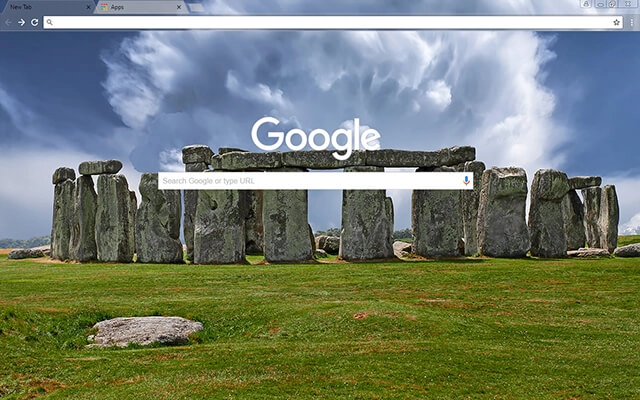
This theme showcases the iconic Stonehenge circle rising from vibrant green grass under swirling, dramatic clouds. The detailed stone textures and striking sky create a powerful scene that blends natural beauty with historical significance.
- Inspires focus through ancient natural beauty.
- Perfect backdrop for history and travel lovers.
- Optimized for Chrome.
- Works great on Chromebook, Windows PC & Mac.
Behind The Theme
Stonehenge was designed to capture the awe of standing before one of the world's most mysterious landmarks. The monumental stones, vivid landscape, and dynamic sky combine to create an energizing backdrop that enhances creativity, boosts focus, and invites deeper thought.
I created this theme after imagining the quiet sunrise at Stonehenge, wanting to capture its ancient power and share that timeless sense of wonder through a bold desktop design.
Screenshots
Stonehenge is currently available in the Chrome Web Store. This custom theme is free to add to your browser and comes with lifetime updates.
How To Install
Installing a Chrome theme only takes a few seconds.
Want to switch back later? Chrome settings → Appearance → Reset to default.
FAQs
Does this Chrome theme slow down my browser?
No. Chrome themes only change the visual appearance of the browser. Performance is affected more by open tabs and installed extensions.
Can I use this theme on a Chromebook?
Yes. If a theme is available in the Chrome Web Store, it works the same way on Chromebooks, Windows, macOS, and Linux.
How do I remove or reset a Chrome theme?
Open Chrome settings, go to Appearance, and click Reset to default. Your browser will instantly return to the standard Chrome theme.
Is this theme free?
Yes. This Chrome theme is free to install from the Chrome Web Store and includes lifetime updates.
Will this theme change my homepage or search engine?
No. Themes only affect colors and background images. They do not modify your homepage, new tab behavior, or search settings.
















