Preview
Theme Overview
Created for users who love wildlife photography, safari imagery, and nature-inspired scenes that bring calm and natural beauty to everyday browsing.
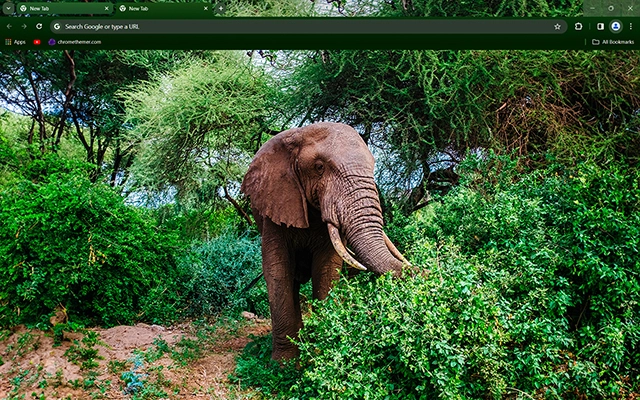
This theme features a majestic elephant standing in a vibrant green forest, surrounded by dense foliage and soft natural lighting. The rich colors and detailed composition create a refreshing, high-definition wildlife backdrop suitable for nature enthusiasts.
- Vivid forest greens create a refreshing look.
- Detailed wildlife photography adds natural charm.
- Optimized for Chrome.
- Works great on Chromebook, Windows PC & Mac.
Behind The Theme
The design blends deep forest textures with the warm tones of the elephant's skin to create a balanced and immersive wildlife scene. Its lush greenery, subtle shadows, and earthy atmosphere make it ideal for users who appreciate natural, calming visuals.
The theme idea grew from recalling a peaceful moment watching wildlife wander through dense greenery, and that sense of quiet strength became the spark for this natural, calming design.
Screenshots
Elephant is currently available in the Chrome Web Store. This custom theme is free to add to your browser and comes with lifetime updates.
How To Install
Installing a Chrome theme only takes a few seconds.
Want to switch back later? Chrome settings → Appearance → Reset to default.
FAQs
Does this Chrome theme slow down my browser?
No. Chrome themes only change the visual appearance of the browser. Performance is affected more by open tabs and installed extensions.
Can I use this theme on a Chromebook?
Yes. If a theme is available in the Chrome Web Store, it works the same way on Chromebooks, Windows, macOS, and Linux.
How do I remove or reset a Chrome theme?
Open Chrome settings, go to Appearance, and click Reset to default. Your browser will instantly return to the standard Chrome theme.
Is this theme free?
Yes. This Chrome theme is free to install from the Chrome Web Store and includes lifetime updates.
Will this theme change my homepage or search engine?
No. Themes only affect colors and background images. They do not modify your homepage, new tab behavior, or search settings.
















