Preview

Theme Overview
Perfect for users who appreciate modern digital art, bold neon colors, and visually striking themes that elevate everyday browsing with creative flair.
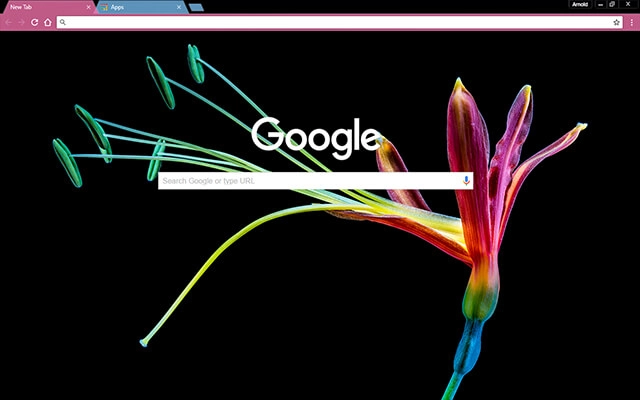
This theme showcases a luminous flower rendered in radiant neon hues, stretching gracefully across a pure black canvas. The glowing colors highlight every petal and stem, creating a vivid, futuristic look that enhances contrast while keeping your tabs clean and easy to navigate.
- High-contrast design enhances visibility.
- Neon colors create visual excitement.
- Optimized for Chrome.
- Works great on Chromebook, Windows PC & Mac.
Behind The Theme
Colorful Flower was created to deliver a bold mix of nature and digital art, turning your browser into a modern visual showcase. The glowing petals and sweeping stems add movement, depth, and brilliant contrast, making every session more inspiring and energizing.
I envisioned a flower illuminated by neon studio lights and captured its glow, shaping it into a theme that blends natural beauty with a futuristic artistic touch.
Screenshots
Colorful Flower is currently available in the Chrome Web Store. This custom theme is free to add to your browser and comes with lifetime updates.
How To Install
Installing a Chrome theme only takes a few seconds.
Want to switch back later? Chrome settings → Appearance → Reset to default.
FAQs
Does this Chrome theme slow down my browser?
No. Chrome themes only change the visual appearance of the browser. Performance is affected more by open tabs and installed extensions.
Can I use this theme on a Chromebook?
Yes. If a theme is available in the Chrome Web Store, it works the same way on Chromebooks, Windows, macOS, and Linux.
How do I remove or reset a Chrome theme?
Open Chrome settings, go to Appearance, and click Reset to default. Your browser will instantly return to the standard Chrome theme.
Is this theme free?
Yes. This Chrome theme is free to install from the Chrome Web Store and includes lifetime updates.
Will this theme change my homepage or search engine?
No. Themes only affect colors and background images. They do not modify your homepage, new tab behavior, or search settings.
















